Home›In Action

Watch the work move, from question to invoice.

Follow legal work the way it reaches your team: a question in Slack, a request, a matter, a contract, an invoice, and the report your General Counsel reads. Every screenshot and video here comes from the demo environment, on sample data, and there is nothing to sign up for.

Book a demo

From the first question to the report the GC reads

The screenshots come from different records in the demo environment, so the matter, the contract and the invoice are separate pieces of work.

  1. Someone asks legal a question, wherever they already are

    An employee asks in Slack, Teams, Zoom Chat, email or the web, and the answer comes from your own policies, source shown. When the policy does not settle it, the question goes to the right attorney with the conversation attached.

  2. The question turns into real work, and nothing is retyped

    Chat becomes a request, and a lawyer turns the request into a matter in one step. The matter carries its owners, stages, checklists and documents, and its timeline fills in as the work happens.

    Describe the budget in a sentence and it sits on the matter.
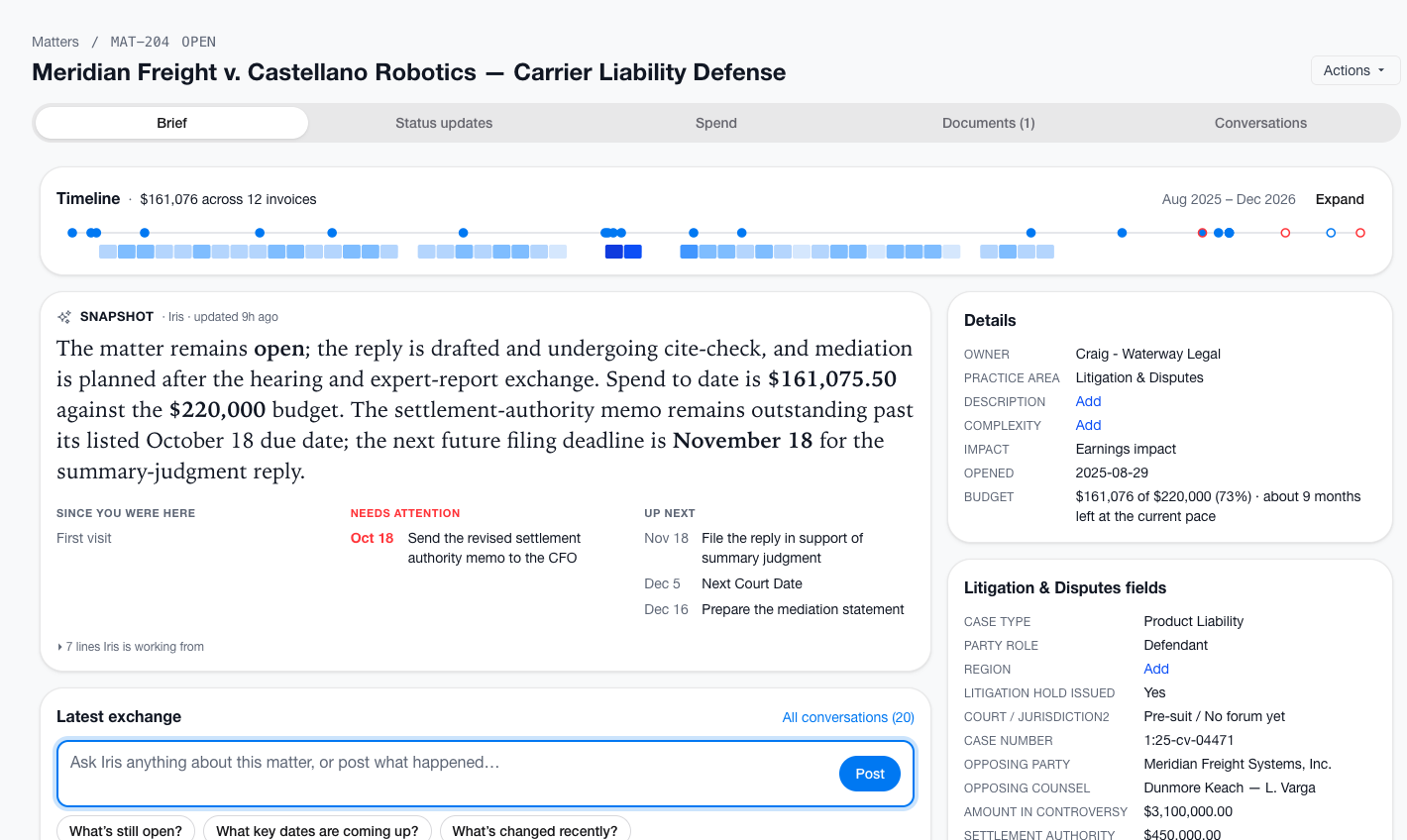
    Demo environment sample data. A matter page, with the Brief tab open, for a sample carrier liability defense matter. A timeline reads $161,076 across 12 invoices. A details panel lists the owner, the practice area Litigation and Disputes, and a budget of $161,076 of $220,000. A box at the bottom lets the user ask Iris about the matter.
    Sample data.
  3. A contract gets its first read from your playbook

    Each term gets a red, yellow or green verdict against your standard ask, fallback and hard no. A contract that meets the playbook goes back as a pass with no lawyer involved. One that does not reaches the right lawyer with a summary, and the findings come back as Word comments.
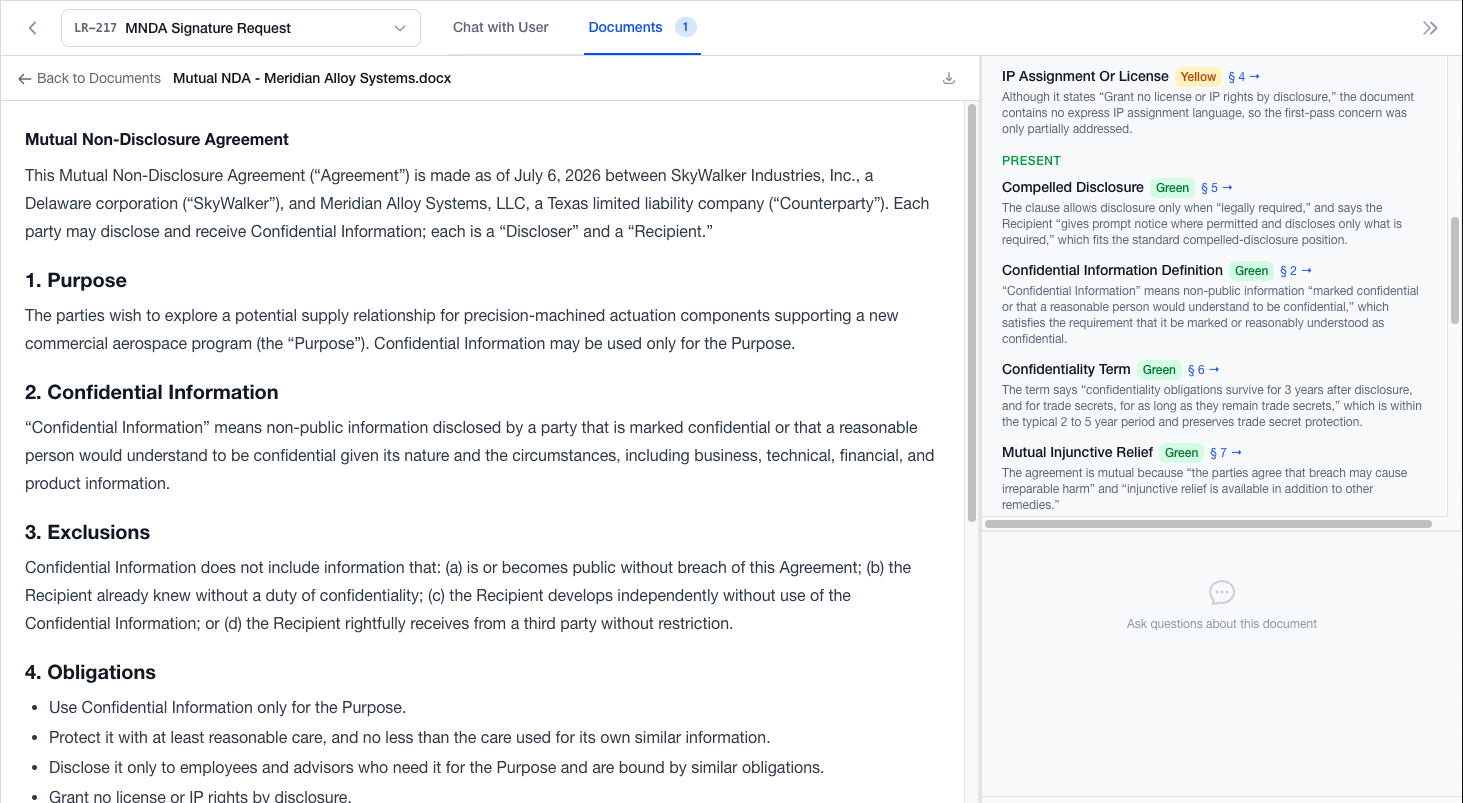
    Demo environment sample data. A reviewed sample mutual NDA with Meridian Alloy Systems open beside its findings. Each term shows a green or yellow verdict and a short reason.
    Sample data.
  4. The invoice arrives already read by the work

    The bill reads as the work the firm did, grouped into workstreams, with every line checked against your rates, approved timekeepers and excluded charges. A person on your team approves, holds or returns it.

    When the CFO asks where legal spend stands, the Legal Ops Scorecard is in the app or in their inbox as a PDF, with spend by matter and by firm, billed against approved.
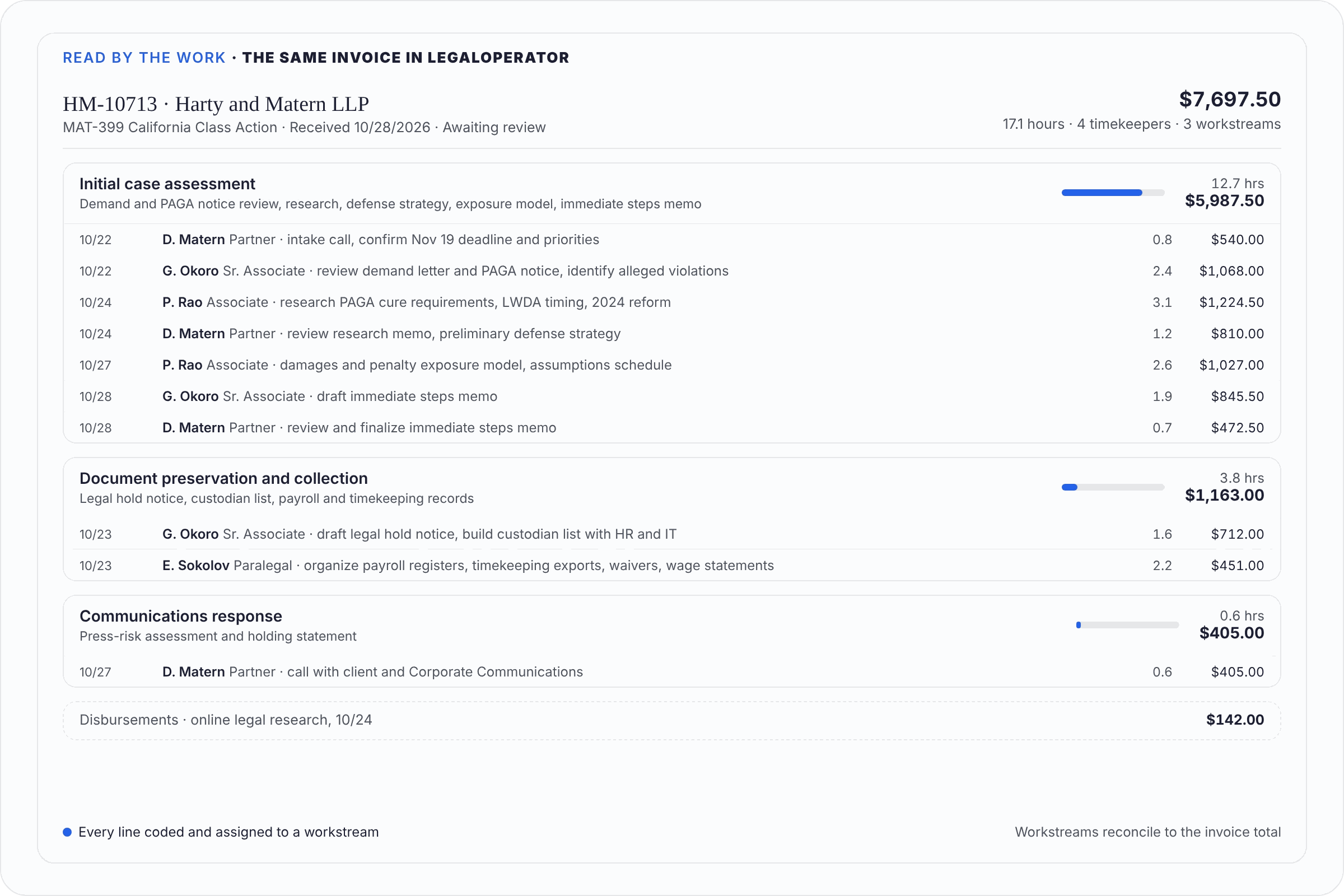
    Demo environment sample data. A sample invoice in LegalOperator marked awaiting review, grouped into three workstreams: Initial case assessment, Document preservation and collection, and Communications response. Each group lists its lines with the timekeeper, hours and cost, and the group totals reconcile to the invoice total.
    Sample data.
  5. The General Counsel knows where every matter stands

    Iris, working as your Matter Agent, drafts the status update. The Matter Lead edits it and locks it, and a locked update becomes the matter’s official word.

    Need a word from the firm? Iris previews an email request, your team confirms it, and the firm replies with no login. The reply lands on the matter.

    The status report, built from locked updates, goes to everyone who follows a matter on your company’s schedule. In the demo video it is every Friday at 10 a.m.

And when it comes up again, ask how you handled it last time

Matter research searches your matters, open and closed, and the archive folders you point it at, for past documents, memos, opinions, notes and emails, and shows the documents behind each answer.

Demo environment sample data. A research question, have we ever experienced a situation with a penalty for late delivery, answered in plain language with a short summary of a prior dispute. A panel on the right lists the cited source documents, and below them the documents that were found but not cited.
Sample data.

Matter Research › Watch: Query the Matter Knowledge Base ›

Watch the demo videos

Each product video shows one task in the demo environment, on sample data.

Start here

Opening frame of the demo video: Start Here 4:32

Start Here

A short introduction to what LegalOperator set out to do and what we believe.

Use cases

Opening frame of the demo video: Automating Visa Legal Intake Workflow Use Case 3:49

Automating Visa Legal Intake Workflow

A requester emails a visa request with four attachments. The video follows the request through the demo environment.

Opening frame of the demo video: Answering a Policy Question in Slack Use Case 4:08

Answering a Policy Question in Slack

An employee asks a policy question in Slack. The answer comes from your own policies, with the source shown.

Opening frame of the demo video: Contract and Document Review Against Your Playbook Use Case 3:30

Contract and Document Review Against Your Playbook

An employee sends legal a document, and it is checked against your playbook. A document that meets the playbook returns as a pass with no lawyer involved. One that does not goes to the right lawyer, and the reviewed document exports to Word.

Opening frame of the demo video: Can an Employee Open-Source Their Own Code? Use Case 3:24

Can an Employee Open-Source Their Own Code?

An engineering manager asks whether a developer can open-source code he wrote on his own time but used inside company systems. The video shows the answer drawing on the IP and brand policies.

Opening frame of the demo video: Managing Compliance Reviews and Gift Approvals Use Case 4:04

Managing Compliance Reviews and Gift Approvals

A requester emails a question about accepting $400 in football tickets from a vendor when the gift policy limit is $300. The compliance attorney works the matter through its checklist, replies to the requester, records the decision and closes the matter.

Product walkthroughs

Opening frame of the demo video: The Escalation Ladder: Chat → Request → Matter Walkthrough 4:41

The Escalation Ladder: Chat → Request → Matter

A question starts in Slack. When the system is not sure, it sends the question to the right attorney with the full conversation, and a lawyer promotes it to a matter in one step. Nothing is retyped.

Opening frame of the demo video: LegalOperator in Microsoft Teams Walkthrough 4:04

LegalOperator in Microsoft Teams

A requester asks legal a question from Microsoft Teams, and the answer comes back in the same chat.

Opening frame of the demo video: Iris: Chief of Staff Part 1 Walkthrough 4:57

Iris: Chief of Staff Part 1

Iris is the AI agent for the legal team. The video shows how Iris answers the team's own questions.

Opening frame of the demo video: Iris: Chief of Staff Part 2 Walkthrough 4:55

Iris: Chief of Staff Part 2

Iris helps administer LegalOperator: invite users, manage teams, practice areas and request categories, and change settings by asking. Every change Iris proposes is a preview that a person on the team confirms.

Opening frame of the demo video: The Self-Building Legal Knowledge Base Walkthrough 3:38

The Self-Building Legal Knowledge Base

How the knowledge base builds itself as your team answers questions.

Opening frame of the demo video: Document & Playbook Management Walkthrough 4:11

Document & Playbook Management

Playbooks and standard documents live in one place, so the AI answers from the latest approved version.

Opening frame of the demo video: Creating and Using Document Templates Walkthrough 3:34

Creating and Using Document Templates

Load a Word template once and Iris maps every fillable field. Anyone can then ask for an NDA, an MSA or another standard document and get a draft back, filled as tracked changes with low-confidence fields flagged.

Opening frame of the demo video: Query the Matter Knowledge Base Walkthrough 3:23

Query the Matter Knowledge Base

Ask a question and get an answer from your matters, open and closed, and from the archive folders you point LegalOperator at, with links to the source documents.

Opening frame of the demo video: Matter Status Updates and Weekly Status Reports Walkthrough 3:45

Matter Status Updates and Weekly Status Reports

Firm contacts reply to a status request by email and the replies land on the matter. Iris drafts a status update, the Matter Lead edits it and locks it, and the status report emails each person the matters they follow. In this demo the schedule is every Friday at 10 a.m.

Book a demo on your own policies.

A demo is 30 minutes, just the product, no slides. Prices are on the pricing page.